TLDR;
The order-tracking process takes three to five business days before a package is dispatched; weekends and holidays do not count. Once it ships, the tracking details arrive by email, so check the inbox and spam folder and mark the seller’s emails as not spam. Track packages through the carrier listed in the email, or use 17TRACK or Parcel App if no carrier is shown or the carrier’s site has no result. Parcel App may provide more up-to-date tracking information, though it can take a little while to load.
- Allow three to five working days for dispatch, excluding weekends and public holidays.
- Check email settings and spam if the tracking message does not arrive.
- Use the tracking number on the named carrier’s website or on 17TRACK or Parcel App.
- Parcel App can sometimes identify delivery updates and carriers when other tracking pages show no result.
Checking Email and Allowing Time for Dispatch [0:00]
Tracking information is sent by email. If it does not arrive, the email address may have been entered incorrectly, or the message may have gone to the spam folder. After placing an order, check the inbox and mark the seller’s emails as not spam so future tracking messages can reach you.
Orders take three to five business days to dispatch. Saturdays, Sundays, and public holidays do not count, so an order placed on Monday may not receive tracking by Friday if five working days have not yet passed.
Tracking a Package with the Carrier [1:30]
After dispatch, an email provides the tracking number and the carrier’s website. Enter the number on that site and search for the shipment’s status. In the example, Correos de España showed that the package had been delivered.
Using 17TRACK or Parcel App [2:17]
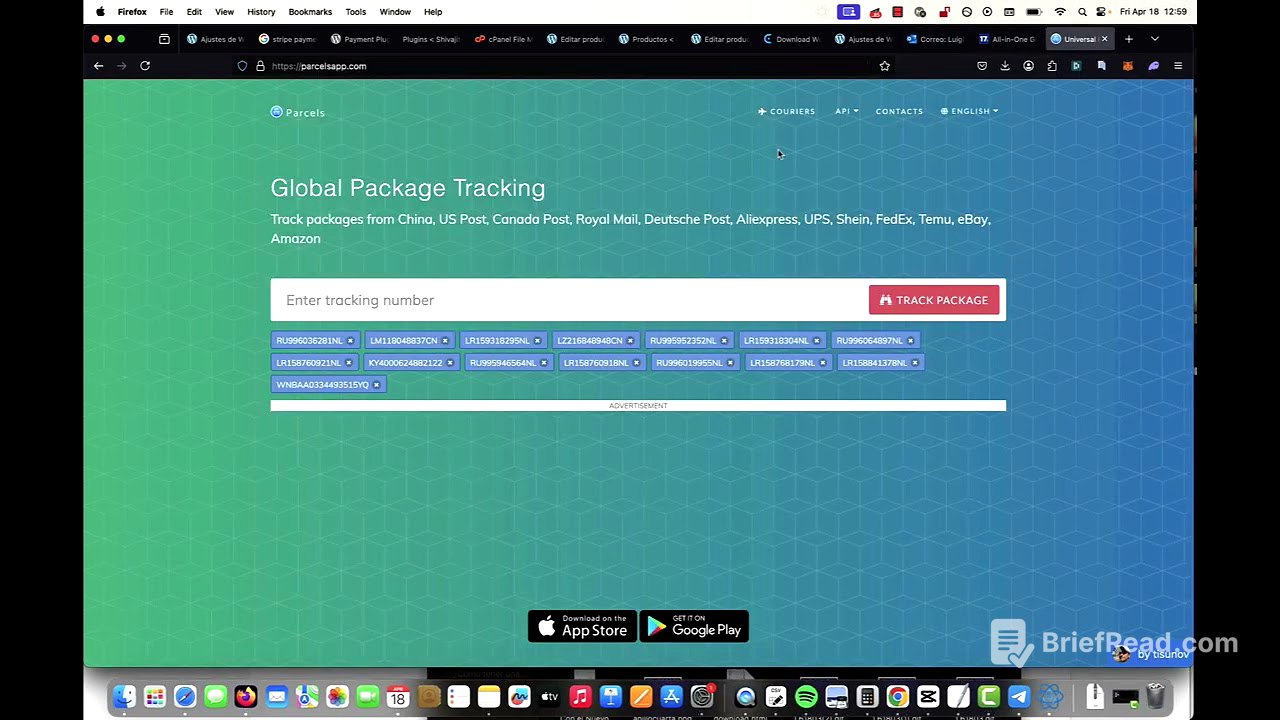
If the carrier’s website does not return a result, enter the tracking number on 17TRACK or Parcel App. These services can often detect which carrier is handling the package. They are also useful when the shipping email provides a tracking number but does not name the carrier.
If 17TRACK shows an error or does not update, try Parcel App. It may take a little while to load, but it can show information unavailable elsewhere, including confirmation that a package was delivered to the recipient’s mailbox. In the example, the shipment traveled through Netherlands Post and was delivered locally by Correos de España.