TLDR;
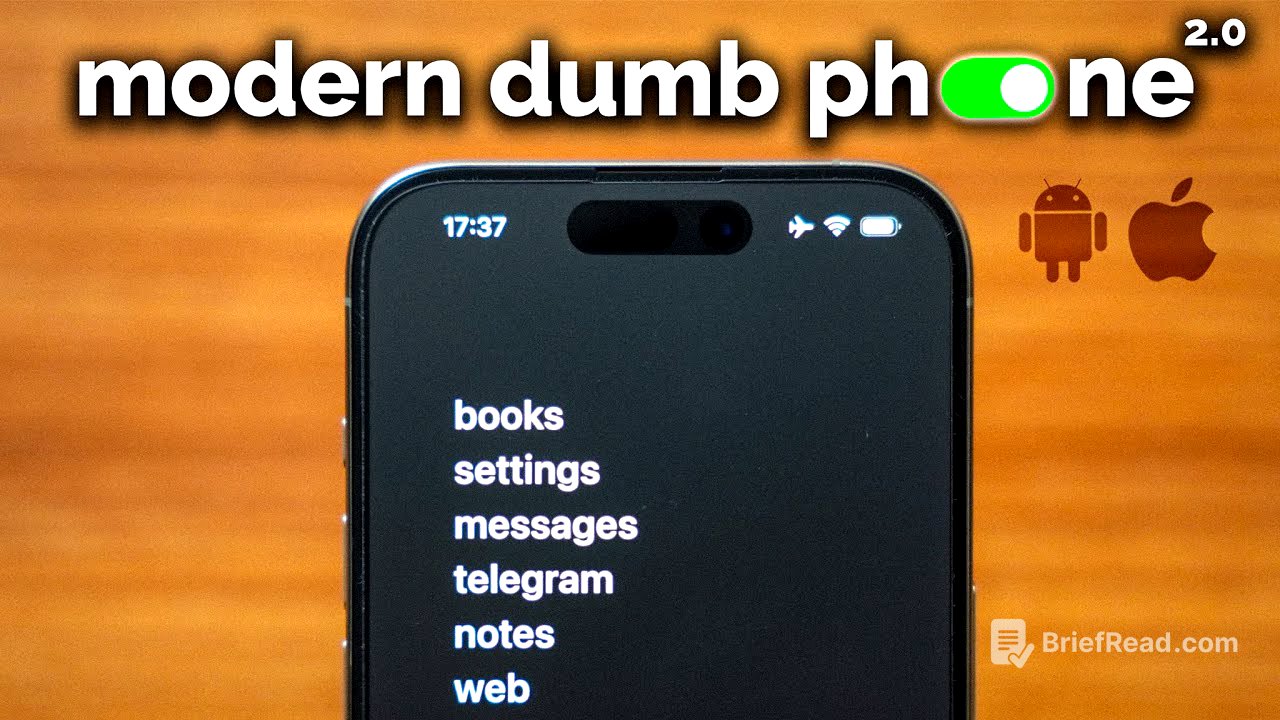
This video introduces the concept of a "modern dumbphone," which involves customizing your existing smartphone to minimize distractions and reduce screen time. It emphasizes setting up your phone to work for you, not against you, by deleting addictive apps, turning off notifications, optimizing the browser, customizing the home screen, and creating a social media schedule. The goal is to regain control over your attention and use technology more intentionally.
- Turn your current smartphone into a "dumbphone" by customizing it.
- Delete addictive apps and limit social media access through browser restrictions.
- Implement a social media schedule to reduce compulsive checking.
What Is The Modern Dumbphone? [0:00]
The modern dumbphone is a system designed to help users reclaim their attention and reduce screen time by customizing their current smartphone. Unlike traditional flip phones, this approach retains the utility of a smartphone while mitigating compulsive usage. Many modern requirements, such as scanning QR codes at restaurants or using digital concert tickets, necessitate a smartphone. By customizing the device, users can avoid the pitfalls of infinite scrolling and addictive apps.
Feature + Setup Walkthrough [0:32]
The modern dumbphone setup includes a minimalistic lock screen with notifications turned off, except for personal messages. The home screen is also minimalistic to avoid distractions. Websites like YouTube and Instagram can be modified to be less addictive by removing thumbnails and recommended videos. The video provides an updated setup guide with cheaper apps, no subscription fees, and updated features, costing less than $10 on both iOS and Android.
Why Do This / Results After Doing This For Over A Year [1:10]
The presenter shares their personal experience of struggling with excessive phone usage, which negatively impacted their sleep, productivity, and social life. Inspired by books like "Atomic Habits," they sought to optimize their phone setup to work for them rather than against them. After one to two years of modifications, the core concept remains the same: the phone should serve the user's needs without being addictive. This setup has led to a healthier relationship with the phone, often leaving it behind during outings and workouts, resulting in significant time savings.
How Apps Try To Addict You [2:42]
Modern app designs are often created to maximize user engagement and time spent on the platform. Comparing current apps to older versions reveals a shift towards less functional designs with more dopamine-triggering widgets and infinite scrolling feeds. Even apps like Google Maps and social media platforms like Instagram and TikTok alter content based on predicted user engagement. While social media isn't inherently bad, compulsive use and consumption of non-beneficial content can be harmful. Therefore, it's crucial to find non-addictive apps and set up your phone to work for you.
iOS + Android Setup Guide [4:20]
There are five main steps to creating a functional modern dumbphone: deleting apps, turning off notifications, optimizing the browser, customizing the home screen, and creating a social media schedule.
#1 Delete Apps [4:36]
The first step involves identifying and deleting apps that are designed to be addictive, such as those with algorithmic feeds or those you compulsively check. Social media apps like YouTube, Reddit, and Instagram should be deleted and accessed only through the browser.
#2 Turn Off Notifications [4:57]
The second step is to turn off all unnecessary notifications, keeping only essential ones like messages. This must be done manually in the settings for both iOS and Android.
#3 Optimize The Browser [5:15]
Users can install extensions on their mobile browsers to modify social media sites. On iOS, this can be done in Safari, while on Android, Firefox is required. The "Social Focus" app, costing $3.99 on iOS and free on Android, allows users to remove algorithmic feeds and recommended content from social media sites. For YouTube, the "Untrap for YouTube" app allows users to remove thumbnails and recommended videos.
#4 Homescreen Customization [6:15]
Using a launcher that displays apps as a list rather than icons can be less stimulating. On iOS, the app "Dmy" ($7 one-time payment) is recommended, while on Android, "O Launcher" (free) is suggested. The goal is to create a minimalistic home screen with only essential apps. Avoid apps with algorithmic feeds, opting for alternatives like Apple Maps over Google Maps. For calorie tracking, MacroFactor is recommended over MyFitnessPal.
#5 Create A Social Media Schedule [7:35]
Creating a schedule for social media and browser usage is crucial for developing healthier habits. Apps like Screen Zen (iOS and Android) and Burnout Buddy (iOS) can block the browser during specific times. Setting a schedule, rather than a time limit, helps reduce the compulsive urge to check the phone. During scheduled access times, users can check social media guilt-free, while the rest of the time, only essential apps are available. On iOS, blocking more than 50 apps may cause issues due to the screen time API.
Additional Tips / Phone Recommendation [9:39]
Additional tips include setting the phone to grayscale on both iOS and Android. For those looking to buy a new phone, the iPhone Mini with a matte screen protector is recommended for its size and feel. Overcoming the addictive nature of technology is essential, and it's important to learn how to use technology for our benefit.



![Learn Python - Full Fundamental Course for Beginners | Python Tutorial for Beginners [2019]](https://wm-img.halpindev.com/p-briefread_c-10_b-10/urlb/aHR0cDovL2ltZy55b3V0dWJlLmNvbS92aS92X1M2NGtsZHJ5Yy9ocWRlZmF1bHQuanBn.jpg)